
Each day you will receive an email with a list of emails that have been quarantined.
If you're waiting on an urgent email and believe it may have been quarantined, you can release it straight away.
Follow these steps:
- Login in to your MailChannels account
- In the left hand menu, click on Logs:

- You will see a filter box at the top of the page:

- Click on the All dropdown and select Quarantined:
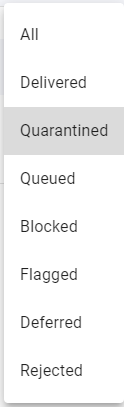
- You will now see a list of all emails that have been quarantined. If the email you are looking for is not there, maybe check the other status such as Blocked or Flagged.
- Once you have found the email hover your mouse over it and the Time column will change to three icons:

- The three icons are release, safelist, blocklist
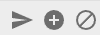
Release will send the email to your inbox
Safelist will add this email address to your safelist and will not be blocked anymore
Blocklist will stop this email address from appearing in your quarantine and will be blocked from now on